12-in-1 Hub
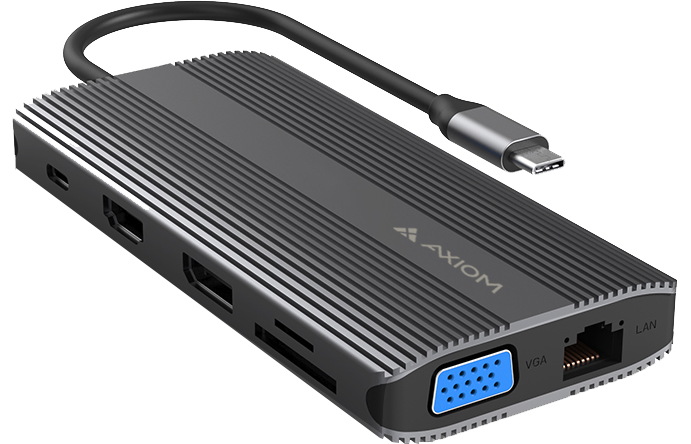
12-in-1 Hub
| Description | Part Number |
|---|---|
| Axiom 12-in-1 USB-C Multiport Hub Adapter | 12N1USBCHPV5CAXD-AX |
| Axiom 12-in-1 USB-C Multiport Hub Adapter w/ 90w USB-C Power Adapter | 12N1CHD90W-AX |
Axiom docking stations and hubs help IT teams, businesses, schools, resellers, and hybrid work users expand device connectivity, simplify desktop setups, and support modern laptop and workstation deployments.
As laptops continue to get thinner and ports become more limited, users often need a simple way to connect monitors, keyboards, mice, storage devices, Ethernet, USB accessories, and power. Axiom docking and hub solutions help turn a laptop or mobile device into a more complete workstation without requiring a full desktop replacement.
Whether your team is supporting office users, remote workers, classrooms, conference rooms, mobile workstations, or fleet refresh projects, Axiom helps identify docking and hub options matched to the device, port type, display requirement, and connectivity need.
Docking stations and hubs are useful when users need more ports than their laptop or device provides. They can help standardize workspaces, reduce cable clutter, and make it easier for users to connect quickly when moving between home, office, classroom, and shared work areas.
Axiom docking stations and hubs can support:
Axiom dock and hub options help users connect the devices and accessories needed for daily work. The right option depends on the laptop or device port, operating system, display requirements, power needs, and connected peripherals.
Axiom docking and hub options may support:
Axiom helps teams match docking and hub options by device model, host port, display output, power delivery needs, operating system, and workspace requirement.
A hub is usually a compact way to add a few extra ports for everyday connectivity. A docking station is often used when a laptop needs a more complete desk setup with monitors, Ethernet, USB peripherals, and power support.
Use a hub when your team needs:
Use a docking station when your team needs:
Docking stations and hubs are often part of a larger device strategy. They help organizations standardize how users connect to displays, networks, and peripherals across different work locations.
Axiom docking and hub solutions can help teams:
Docking and hub compatibility depends on the device port, operating system, power requirements, display support, and the type of accessories being connected. A USB-C port, for example, may not support every display, charging, or data function unless the system is designed for it.
Before selecting a dock or hub, confirm:
Axiom can help identify docking and hub options that fit the device and connectivity requirement.
Axiom helps organizations keep users connected and productive with practical expansion options for supported laptops, workstations, tablets, and business devices.
Before selecting a docking station or hub, confirm:
If you are not sure which dock or hub fits your device or workspace, Axiom can help verify compatibility before purchase.
A hub usually adds a small number of ports in a compact form factor. A docking station is typically used for a more complete desk setup with displays, Ethernet, USB peripherals, and power support where supported.
Not always. USB-C ports can support different features depending on the device. Some USB-C ports support display output, charging, or high-speed data, while others may not. Always confirm the system requirements before selecting a hub.
Some docking stations support multiple monitors when the laptop, operating system, dock, cable, and display configuration all support it. Confirm monitor count, resolution, refresh rate, and connector requirements before purchase.
Some USB-C docks and hubs support power delivery passthrough or charging, but not all do. The laptop must also support charging over that connection type.
Confirm the device model, host port type, required ports, display requirements, power delivery needs, operating system support, and whether the setup is for travel, desk use, or shared workspaces.
Yes. Axiom helps customers match device models, connection types, display needs, power requirements, and workspace requirements to compatible docking and hub options.
Need help finding the right dock, USB-C hub, multi-port adapter, or workspace connectivity solution? Axiom helps identify compatible options by device model, port type, display requirement, power delivery need, and deployment environment.
Get fast pricing for your exact configuration and requirements.


